



Every contract version, fully traceable




in Germany

certified

encrypted
Trusted by over 10000 happy users


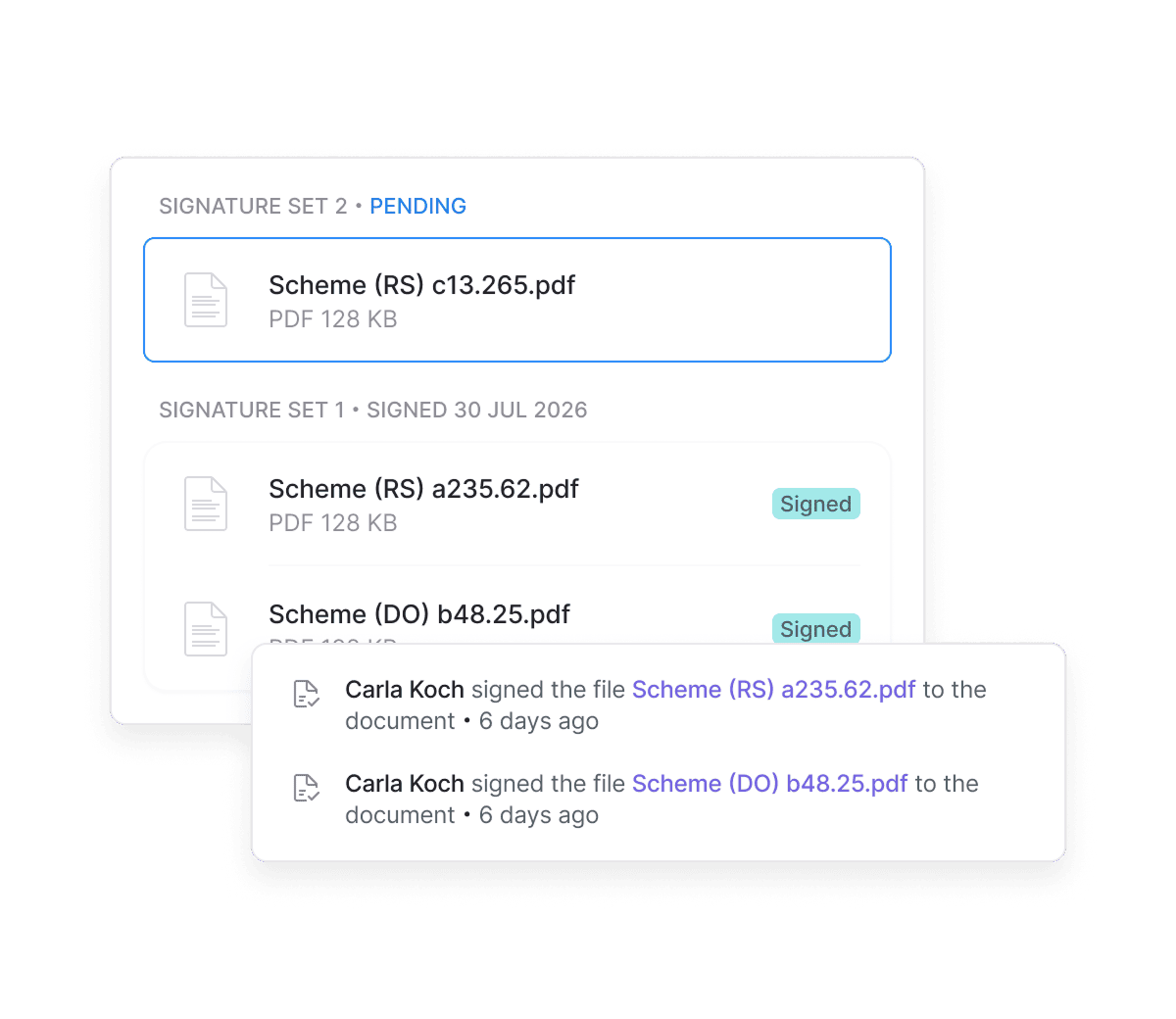
Add new versions to contracts that are already signed
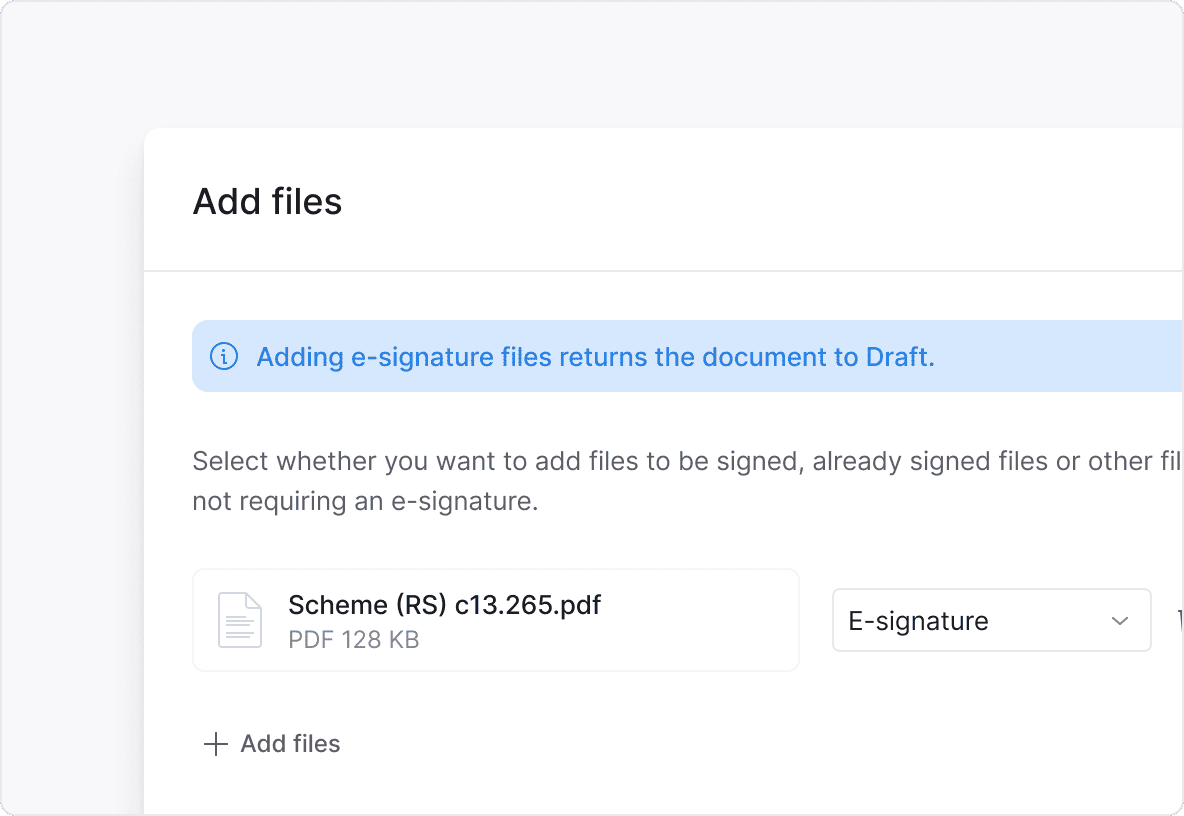
Start a separate signing process for every change
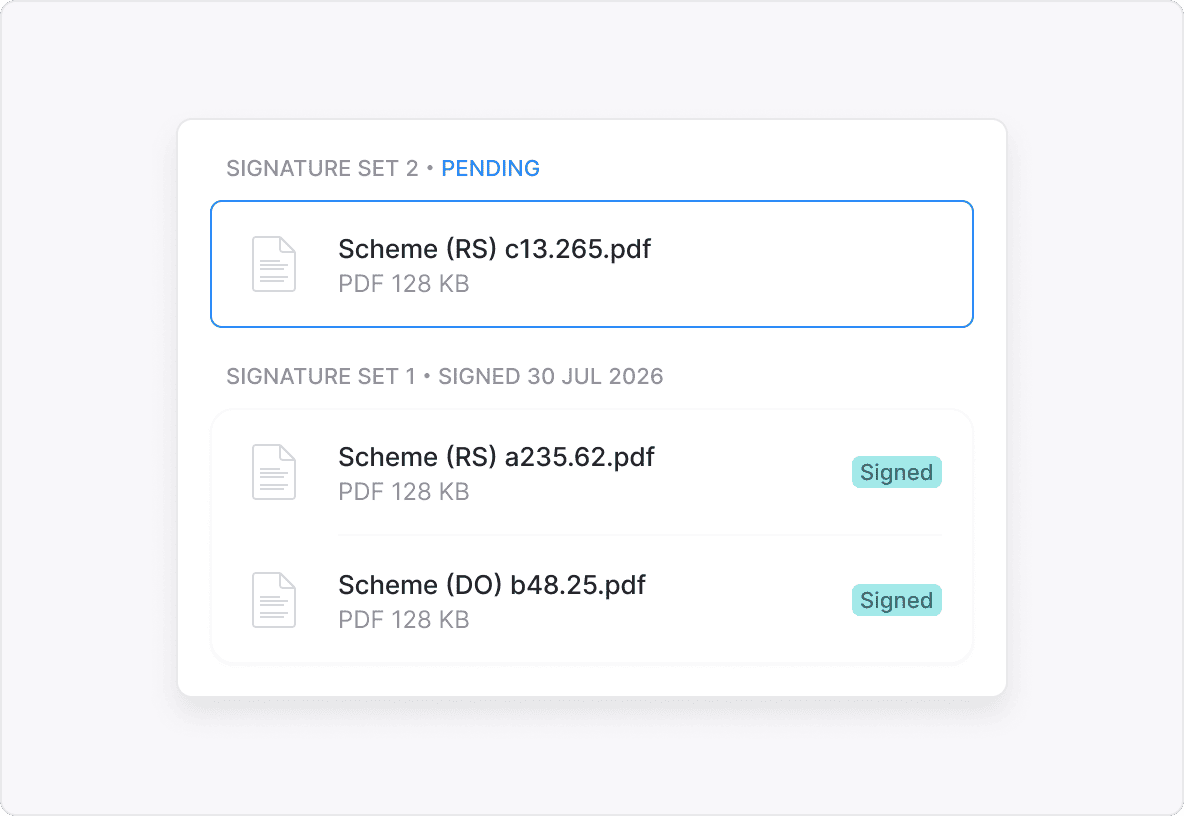
Keep the full contract change history in one place
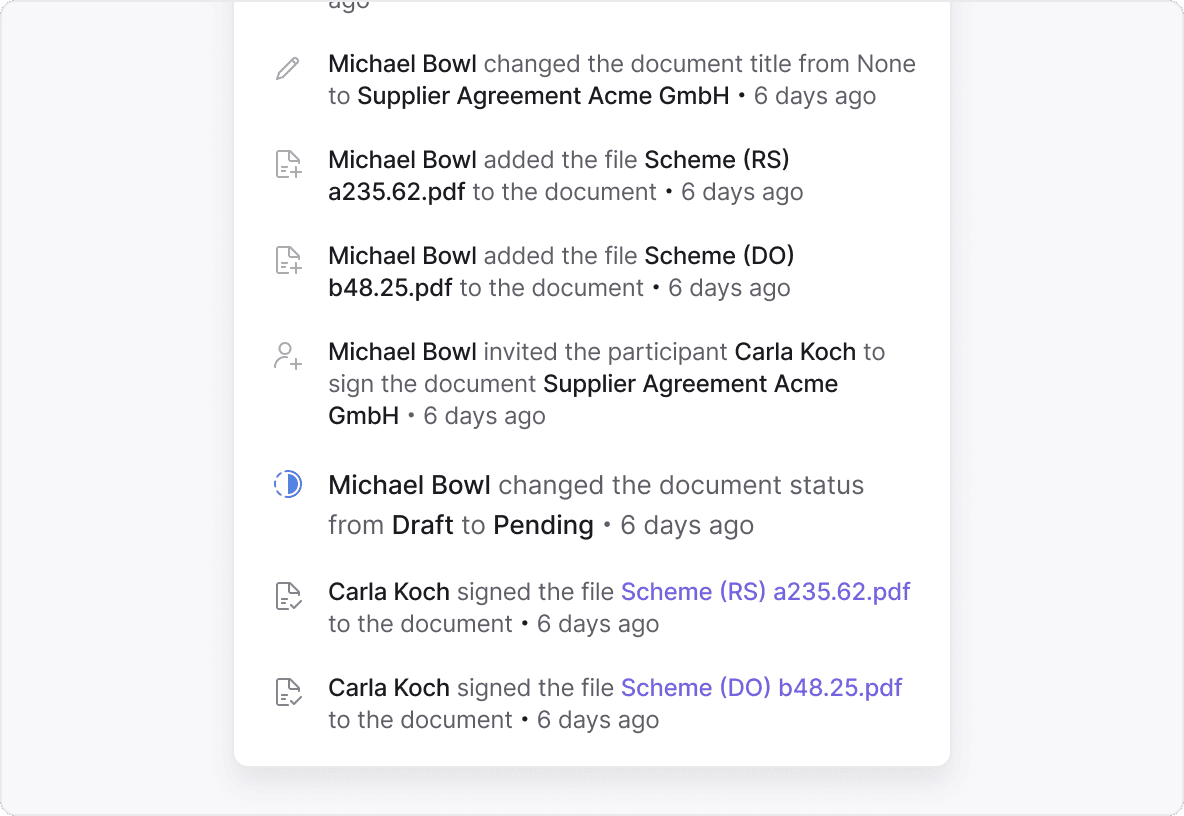
A transparent contract history, from the first signature to the latest change


Fewer scattered documents. More control over every change.
“Powerfully simple”
 Automatic deadline monitoring is a real game changer for us. We used to manage deadlines manually in Excel spreadsheets, which was naturally error-prone. Now Inhubber ensures that we are notified in a timely manner about upcoming termination periods. This has already saved us from unnecessary costs.
Automatic deadline monitoring is a real game changer for us. We used to manage deadlines manually in Excel, which was error-prone. Now Inhubber notifies us in time about upcoming termination periods, helping us avoid missed deadlines and unnecessary costs.
Automatic deadline monitoring is a real game changer for us. We used to manage deadlines manually in Excel spreadsheets, which was naturally error-prone. Now Inhubber ensures that we are notified in a timely manner about upcoming termination periods. This has already saved us from unnecessary costs.
Automatic deadline monitoring is a real game changer for us. We used to manage deadlines manually in Excel, which was error-prone. Now Inhubber notifies us in time about upcoming termination periods, helping us avoid missed deadlines and unnecessary costs.

 Especially in the logistics sector, many contracts are long and complex. With the AI summary, I can understand a 40-page contract in just a few sentences. This saves an incredible amount of time. When I log in in the morning, I immediately see upcoming deadlines, tasks, and signature requests. That way, I know right away what I need to focus on. It used to be much more unclear.
Especially in logistics, contracts are often long and complex. With AI summaries, I can understand a 40-page contract in seconds, saving significant time. Each morning, I instantly see deadlines, tasks, and signature requests—so I know exactly what to focus on.
Especially in the logistics sector, many contracts are long and complex. With the AI summary, I can understand a 40-page contract in just a few sentences. This saves an incredible amount of time. When I log in in the morning, I immediately see upcoming deadlines, tasks, and signature requests. That way, I know right away what I need to focus on. It used to be much more unclear.
Especially in logistics, contracts are often long and complex. With AI summaries, I can understand a 40-page contract in seconds, saving significant time. Each morning, I instantly see deadlines, tasks, and signature requests—so I know exactly what to focus on.

 Inhubber has fundamentally changed the way we handle our contracts by providing a user-friendly and efficient platform that ensures complete transparency. This change has led to significant time savings, particularly through improved organization and accessibility of data. In the financial sector, it is especially useful as it helps keep track of costs and deadlines, making it an essential tool for our sustainable growth.
Inhubber has transformed contract management with a user-friendly platform and full transparency. It saves time through better organization and data access. In finance, it’s valuable for tracking costs and deadlines, supporting growth.
Inhubber has fundamentally changed the way we handle our contracts by providing a user-friendly and efficient platform that ensures complete transparency. This change has led to significant time savings, particularly through improved organization and accessibility of data. In the financial sector, it is especially useful as it helps keep track of costs and deadlines, making it an essential tool for our sustainable growth.
Inhubber has transformed contract management with a user-friendly platform and full transparency. It saves time through better organization and data access. In finance, it’s valuable for tracking costs and deadlines, supporting growth.

 Thanks to Inhubber, it is now much easier and faster to rent out apartments, and I can even rent them out across the country without having to be there.
Thanks to Inhubber, it is now much easier and faster to rent out apartments, and I can even rent them out across the country without having to be there.
Thanks to Inhubber, it is now much easier and faster to rent out apartments, and I can even rent them out across the country without having to be there.

 Before we introduced Inhubber, we missed termination deadlines several times simply because no one remembered that the contract still existed and needed to be cancelled. This led to unnecessary costs that we wanted to avoid. With Inhubber, we can now be confident that this will no longer happen.
Before Inhubber, we missed termination deadlines because contracts were overlooked, leading to unnecessary costs. Now, we’re reliably notified in time and can be confident that deadlines are no longer missed.
Before we introduced Inhubber, we missed termination deadlines several times simply because no one remembered that the contract still existed and needed to be cancelled. This led to unnecessary costs that we wanted to avoid. With Inhubber, we can now be confident that this will no longer happen.
Before Inhubber, we missed termination deadlines because contracts were overlooked, leading to unnecessary costs. Now, we’re reliably notified in time and can be confident that deadlines are no longer missed.

 The advantages I see with Inhubber are, firstly, usability, meaning it’s easy to use for our team members and business partners. The second major advantage I see with Inhubber is the whole issue of data security, data availability, and more.
The advantages I see with Inhubber are, firstly, usability, meaning it’s easy to use for our team members and business partners. The second major advantage I see with Inhubber is the whole issue of data security, data availability, and more.
The advantages I see with Inhubber are, firstly, usability, meaning it’s easy to use for our team members and business partners. The second major advantage I see with Inhubber is the whole issue of data security, data availability, and more.

 After evaluating several software solutions, we chose Inhubber – not only because it offers a web-based solution that’s accessible from anywhere, but also because of the flexibility in structuring contracts. We wanted the option of storing our contracts in clearly structured categories and areas that perfectly fit our organization.
After evaluating several solutions, we chose Inhubber for its web-based accessibility and flexible contract structuring. It allows us to organize contracts into clear categories and areas that perfectly match our organization.
After evaluating several software solutions, we chose Inhubber – not only because it offers a web-based solution that’s accessible from anywhere, but also because of the flexibility in structuring contracts. We wanted the option of storing our contracts in clearly structured categories and areas that perfectly fit our organization.
After evaluating several solutions, we chose Inhubber for its web-based accessibility and flexible contract structuring. It allows us to organize contracts into clear categories and areas that perfectly match our organization.

 Inhubber was the perfect solution for our family-owned business.
We now have a complete overview of all contracts — structured by business units and contract types. Relevant documents are always easy to find, deadlines are automatically tracked, and nothing gets lost anymore.
What impressed us most was the 100% transparency, the ease of use, and the automatic identification of contract risks. Manual effort has been significantly reduced — we save around 80% of the time compared to before.
Inhubber has sustainably professionalized and simplified our contract management.
Inhubber is the perfect solution for our family business. We now have a full overview of all contracts, clearly structured and easy to access. Deadlines are tracked automatically, risks are identified, and manual effort is reduced—saving us around 80% of the time.
Inhubber was the perfect solution for our family-owned business.
We now have a complete overview of all contracts — structured by business units and contract types. Relevant documents are always easy to find, deadlines are automatically tracked, and nothing gets lost anymore.
What impressed us most was the 100% transparency, the ease of use, and the automatic identification of contract risks. Manual effort has been significantly reduced — we save around 80% of the time compared to before.
Inhubber has sustainably professionalized and simplified our contract management.
Inhubber is the perfect solution for our family business. We now have a full overview of all contracts, clearly structured and easy to access. Deadlines are tracked automatically, risks are identified, and manual effort is reduced—saving us around 80% of the time.

 With Inhubber, we now have a central overview of our contracts for the first time and much better control over long-term deadlines. What stands out most is how intuitive the system is: responsibilities are clearer, contracts are easier to find, and relevant information is available in a structured way. Inhubber makes professional contract management simple — and I would clearly recommend it to other municipal utilities.
With Inhubber, we have a central overview of our contracts and much better control over deadlines. The intuitive system creates clearer responsibilities, makes contracts easier to find, and noticeably simplifies our day-to-day work.
With Inhubber, we now have a central overview of our contracts for the first time and much better control over long-term deadlines. What stands out most is how intuitive the system is: responsibilities are clearer, contracts are easier to find, and relevant information is available in a structured way. Inhubber makes professional contract management simple — and I would clearly recommend it to other municipal utilities.
With Inhubber, we have a central overview of our contracts and much better control over deadlines. The intuitive system creates clearer responsibilities, makes contracts easier to find, and noticeably simplifies our day-to-day work.

 With Inhubber, we now have a clear central structure for our contracts, deadlines, and responsibilities. The system is easy to use, flexible enough to support our different departments, and helps us find contract information much faster. Automated deadline tracking and clearly defined access rights also make our day-to-day contract work more reliable and much easier to manage.
With Inhubber, we now have a clear central structure for our contracts, deadlines, and responsibilities. The system is easy to use, flexible enough for our different departments, and makes everyday contract work noticeably faster and more reliable.
With Inhubber, we now have a clear central structure for our contracts, deadlines, and responsibilities. The system is easy to use, flexible enough to support our different departments, and helps us find contract information much faster. Automated deadline tracking and clearly defined access rights also make our day-to-day contract work more reliable and much easier to manage.
With Inhubber, we now have a clear central structure for our contracts, deadlines, and responsibilities. The system is easy to use, flexible enough for our different departments, and makes everyday contract work noticeably faster and more reliable.


Award winning CLM software






FAQ
Yes. New files — an amendment, an updated attachment, a new version — can be added straight to a contract that’s already signed. From there, a separate signing process kicks in, while the original contract stays part of the full contract history.
A Signature Set is its own group of files with its own signing process, living inside the same contract. It’s how you add and sign new documents after a previous signing process is already done and dusted.
No. Amendments and changes go directly onto the existing contract. They stay connected to the original document, all part of one centralized history.
They’re preserved — nothing disappears. You can always access the original documents, every later change, and the signing processes that go with them.
Yes. A separate Signature Set can be created for a new file or group of files, so you can kick off a fresh signing process without re-signing versions that are already done.
Yes. Every contract-related action lands in the Activity Log — so you can trace the full sequence of changes and signing processes across the contract’s entire life.
Every related document, signed version, and activity stays in one place. Auditors and internal teams aren’t stuck comparing files across different folders or systems — the whole change history is centralized and easy to trace.
Anything that keeps changing after signing: amendments, extensions, updated terms, revised attachments — any document that needs to stay connected to the original agreement instead of floating off on its own.